
What’s Coming in WordPress 7.1: Interactive Styling, New Blocks, and a Smarter Admin


Target release: August 19, 2026 — the final day of WordCamp US in Phoenix.
At DreamHost, we host WordPress for hundreds of thousands of sites — so when a major release is on the horizon, we dig in early. Here’s what’s worth your attention in 7.1.
WordPress 7.0 “Armstrong” was a landmark release: the first provider-agnostic AI Client, async collaboration with Notes, and a top-to-bottom admin redesign. But a few headline items didn’t make the cut — most notably real-time collaboration and client-side media processing.
WordPress 7.1 is the second major release of 2026, and it’s shaping up to be a “finish what we started” release: iterate on the AI and collaboration foundations from 7.0, ship the styling and media features that got punted, and add a handful of genuinely new blocks.
Below is what’s most likely to land, what slipped from 7.0 and is now aiming for 7.1, and a few things we’d love to see but probably won’t get this cycle.
A note on timing: Everything here is a moving target. WordPress features are merged right up until the feature freeze, and items get deferred every single cycle (just ask real-time collaboration). Treat the “Likely to land” list as probable, not promised.
The 7.1 Release Timeline
Release Squad: Anne McCarthy (Release Lead), with Aki Hamano and Joe Dolson as Tech Leads.
Part 1: Features Most Likely to Land in 7.1
These are on the official roadmap with real momentum in the codebase.
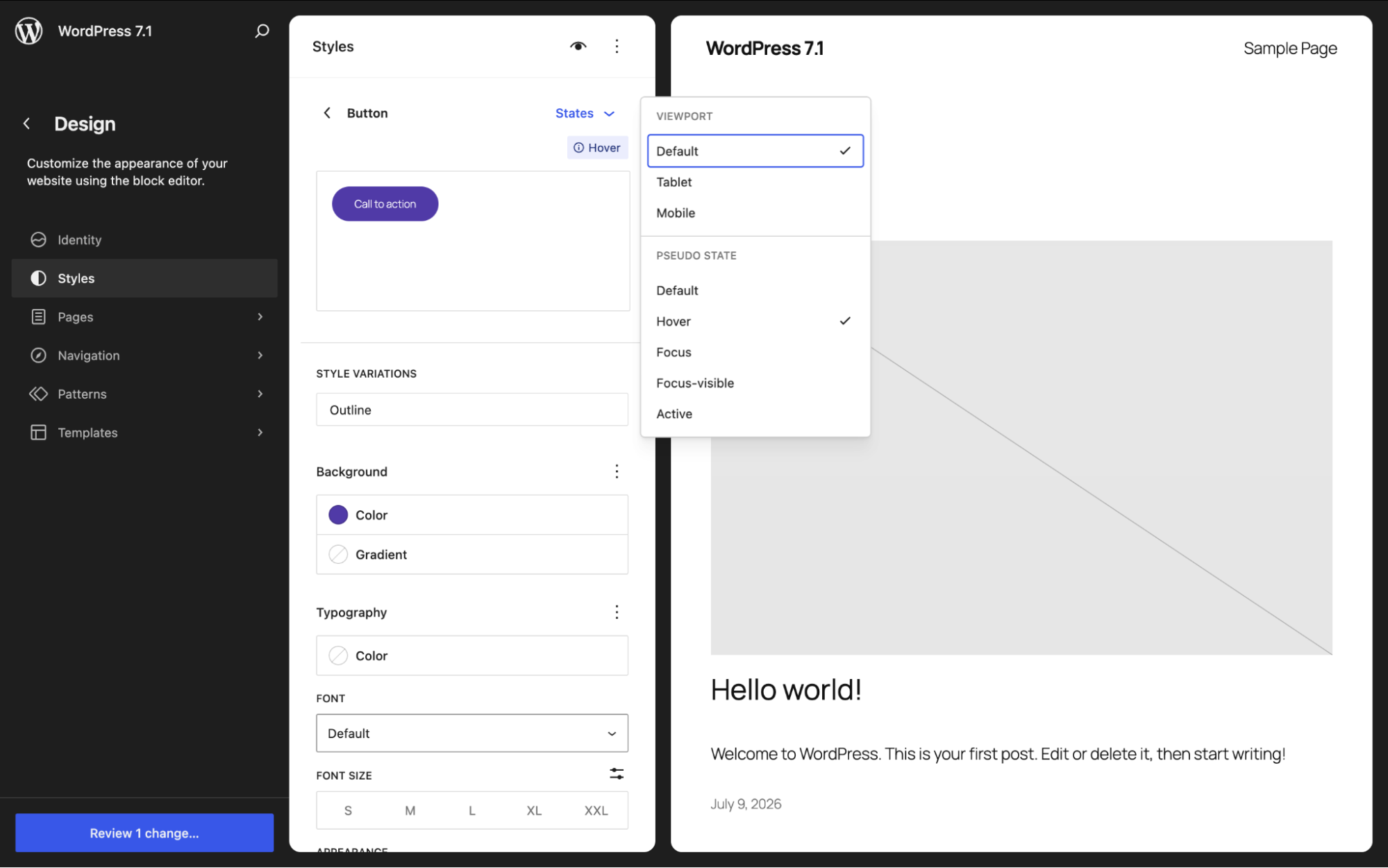
1. Interactive States Styling (hover, focus, active) — No CSS required
This is the feature to lead with. WordPress 7.1 introduces pseudo-state styling for both Global Styles and individual blocks. You can style how a block looks on :hover, :focus, and :active — a button that changes color when you mouse over it, a link that shifts on focus — all from the interface, without touching CSS.
What this means for you: Interactive design that used to require custom CSS (or a page builder) now lives in the native editor. A single block can carry its own hover styles without changing every other instance of that block on the site.
2. Three New Core Blocks: Playlist, Table of Contents, and Tabs
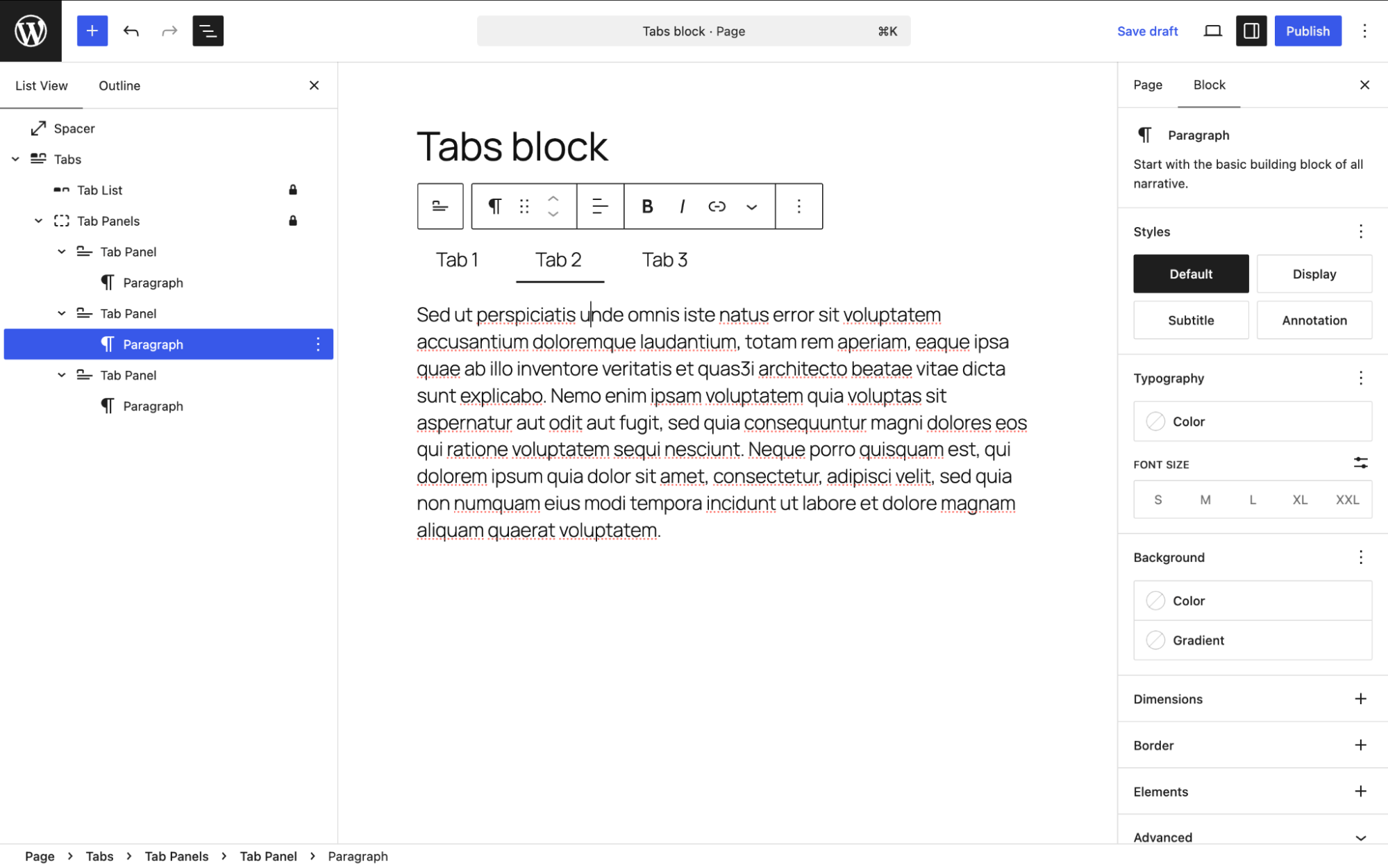
- Tabs block – the most mature of the three. It’s been through several rounds of refactoring in recent Gutenberg releases, with a Tabs Menu and refined inner-block structure. Long-requested; finally close.
- Playlist block – an audio playlist block, with waveform visualization in the works.
- Table of Contents block – a native TOC that auto-generates from your headings. Caveat: progress on this one has looked slower than the other two, so it’s the most likely of the three to slip.
What this means for you: Native tabs, audio playlists, and auto-generated tables of contents without a plugin. Three fewer reasons to reach for a page builder.
3. Responsive and Inherited Styling
Alongside interactive states, 7.1 is pushing on responsive styling — adjusting styles per screen size — plus better visibility into inherited styles (seeing where a block’s styling actually comes from) and customizable viewport breakpoints.
4. AI Client and Connectors, Iteration 2
7.0 shipped the foundation; 7.1 makes it more capable.
- Streaming generation and embeddings in the AI Client, so plugin authors can build richer, more responsive AI features.
- Connectors gains authentication options beyond plain API keys.
5. AI Guidelines — Encode Your Brand Voice Once
A new Guidelines system gives you a persistent, structured place to define editorial rules, content standards, and brand voice — so both human editors and AI tools stay on-message. The underlying storage mechanism (a proposed wp_knowledge custom post type) is still being scoped.
What this means for you: Instead of re-explaining your style to an AI on every prompt, you define it once, and it travels with the site.
6. Admin and Site Editor Polish
The 7.1 admin polish is about reducing the number of times you think “why doesn’t this just work?” Six changes, all of them worth it.
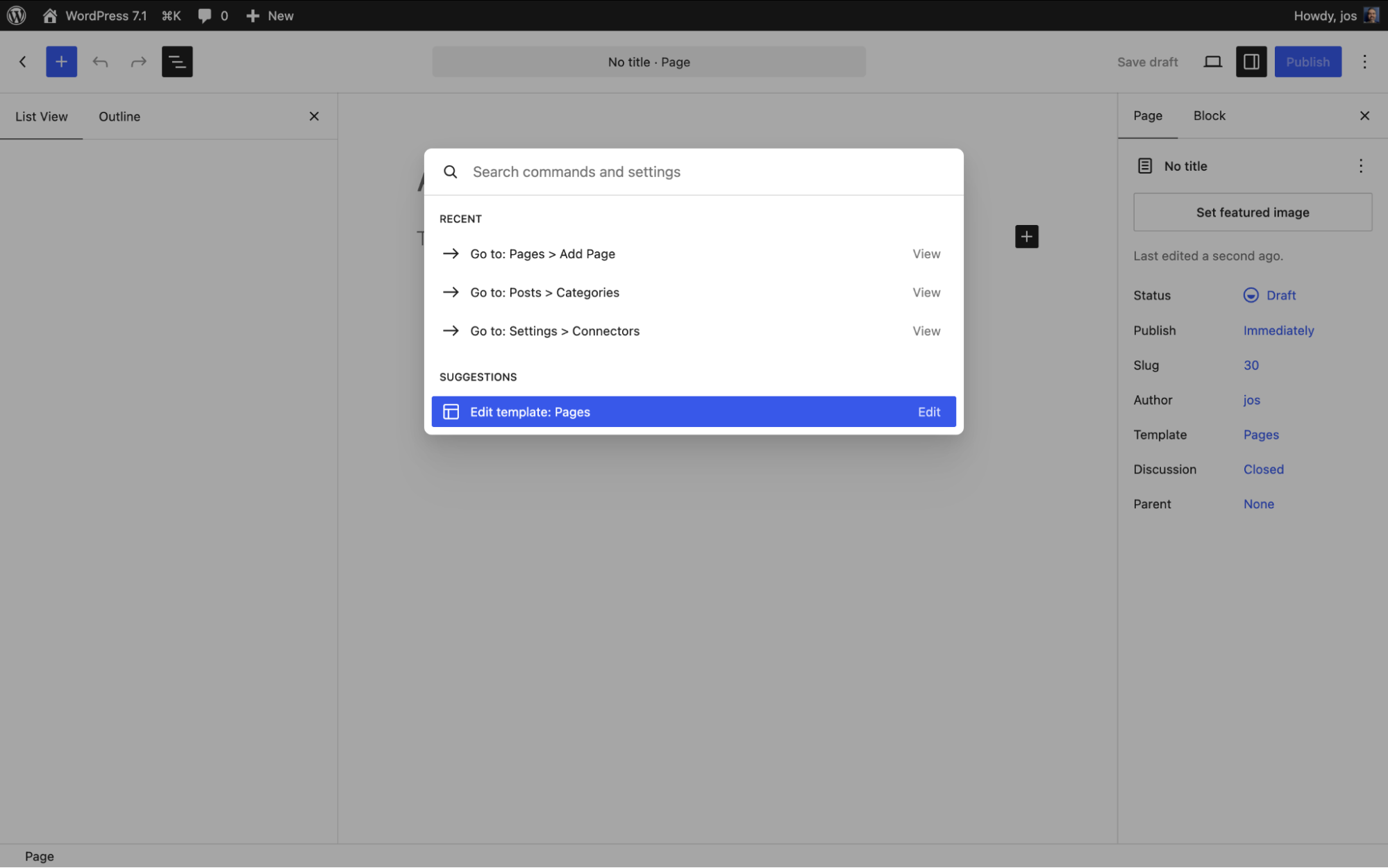
- Reorganized command palette (Cmd/Ctrl+K) – with recent and suggested commands.
- Admin color scheme reflected in the Site Editor – your chosen colors finally carry through.
- Persistent admin bar across editors – an “omnibar.”
- New “On This Day” dashboard widget.
- A dedicated Identity section – for core site settings.
- Revision improvements – including spark-line visualization of edit history.
7. Async Collaboration: Notes Leveled Up
Building on 7.0’s Notes, 7.1 adds rich text in notes, emoji reactions, and a suggestion mode for asynchronous feedback — closer to what you’d recognize from Google Docs.
8. Under the Hood (for Developers)
- React 19 (up from React 18).
- Abilities API expansion.
- Block Bindings for list items and inner blocks.
- Enforced iframed editor for block-based themes.
- Extended Unicode support in email addresses and usernames.
- Speculative loading refinements when object/page caching is detected.
Part 2: Deferred from 7.0 — Now Aiming for 7.1
These were on the 7.0 list, didn’t make it, and are back in play.
Client-Side Media Processing
Punted from 7.0, still in active development. The goal: process images in the browser before upload — HEIC and Ultra HDR conversion, GIF-to-video, and a new freeform image cropper — reducing server load and giving you more control at upload time.
Real-Time Collaboration — Still Unresolved
The big one. Real-time (Google-Docs-style simultaneous) editing was pulled from 7.0 over stability concerns, and for 7.1 it’s still described by the release team as facing “big, open strategy questions” about feature scope and how edits are stored. Don’t count on it for 7.1. The async Notes/Suggestions improvements above are the safe bet; live co-editing is the aspirational one.
Part 3: The Wishlist — Cool to Have, But Don’t Bet On It
Things the community would love in 7.1 that are uncertain, early, or unlikely this cycle:
- A truly finished Table of Contents block – it’s on the list, but the slowest of the three new blocks.
- Real-time collaboration – see above; the dream feature that keeps slipping.
- Deeper responsive design controls – per-breakpoint everything, not just a subset of properties.
- Fuller interactive-state coverage – hover/focus/active is landing, but styling every state on every block consistently is a longer road.
- A fuller Guidelines / wp_knowledge system – the core Guidelines feature is landing, but the proposed wp_knowledge custom post type — site-wide editorial rules with import/export between sites — is still aspirational this cycle.
What Happened to Hiding the Classic Block?
Quick clarification, because it flip-flopped: an earlier plan to hide the Classic block from the inserter in 7.1 was reversed. The core/freeform (Classic) block stays visible, the deprecation notice was removed, and the related filter never shipped in a stable release. The reasoning: “The Classic block should become obsolete by choice, not by force.” Instead, effort is going into a better “Convert to Blocks” experience and closing the gaps (tables, inline formatting, HTML preservation) that keep people on Classic in the first place.
The Bottom Line
WordPress 7.1 isn’t a reinvention — it’s a sharpening. The AI and collaboration foundations from 7.0 get more useful, styling finally reaches into interactive and responsive states without code, media processing moves to the browser, and a few long-awaited blocks arrive. Real-time collaboration remains the tantalizing “maybe.”
If 7.0 laid the groundwork, 7.1 is where a lot of it becomes something you’ll actually click, style, and ship — provided it all lands on schedule. And as always with WordPress: some of it won’t. Build accordingly.

WordPress Hosting
Unbeatable WordPress Hosting
Reliable, lightning-fast hosting solutions specifically optimized for WordPress.
See More
Did you enjoy this article?
